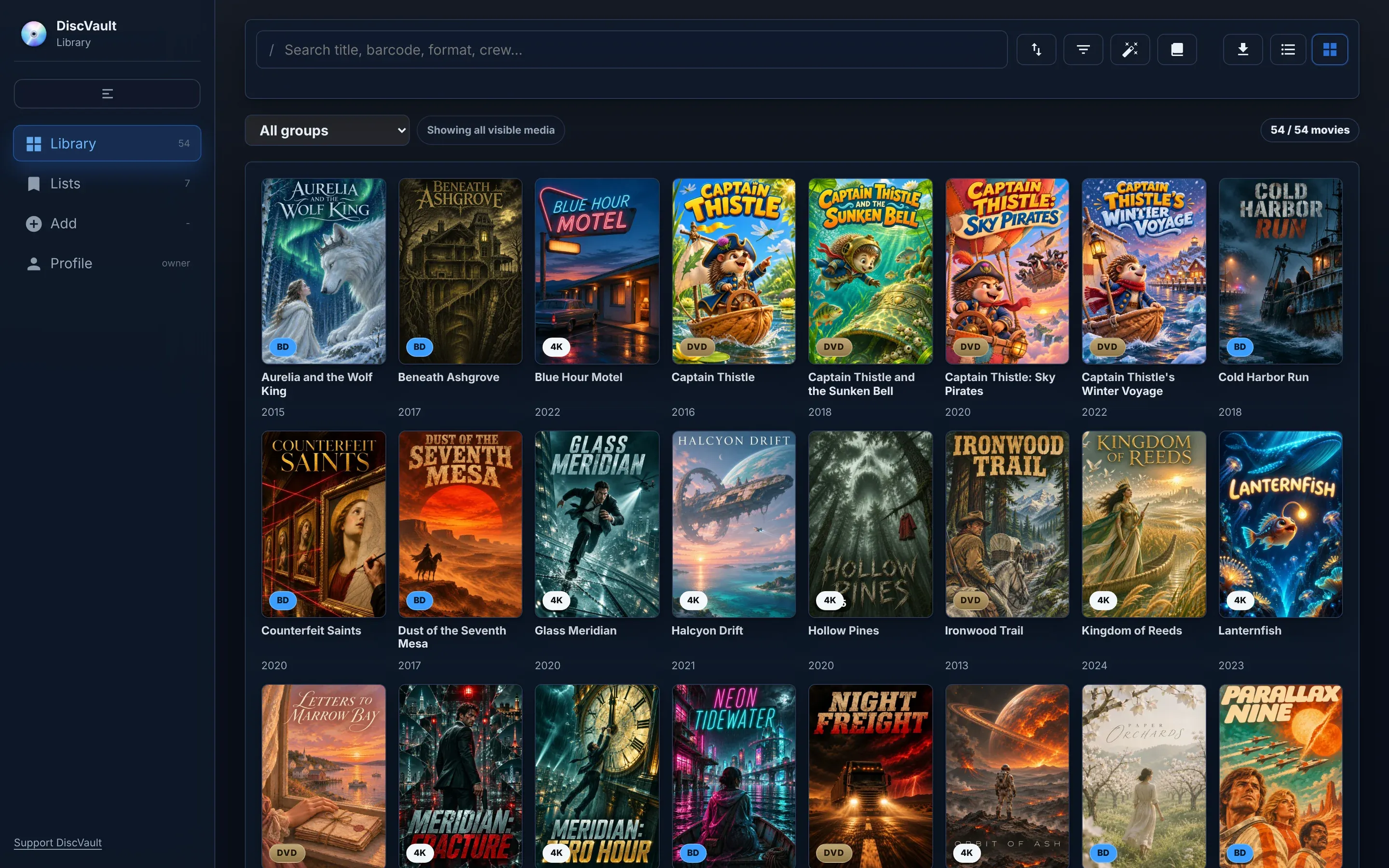
A library that looks like your shelf


- Posters, a list or a detail view
- Filter by 4K, Blu-ray or DVD
- Search by title, barcode, cast or crew
- Box sets open to the films inside
- Quick, even on a large collection
 DiscVault
 keeps track of every film you own on 4K, Blu-ray and DVD. Scan a barcode and the title, edition and cover fill themselves in.
For iPhone and iPad, or self-hosted on your own server. Android is in beta.


Every disc has a barcode. Pick one of these and see what DiscVault makes of it.
No barcode? Search by title, or paste an IMDb or TMDB ID.

Added to your library

Added to your library

Added to your library

Added to your library
On iPhone and iPad the disc catalogue lives on the device, so a scan works offline.
It files itself.
A 4K disc is not a Blu-ray. A Steelbook is not a keep case. Box sets, and the discs inside a release, are catalogued as what they are.
The shelf on this page is a demo library of 54 invented films.
The self-hosted edition is a web app for the whole household. It installs on Docker, Unraid or Home Assistant.
Read the install guide


The migration wizard carries your collection across to the current DiscVault.
Read the migration guideOn the device in your pocket, or on a server in your home. Both are DiscVault; pick where your collection lives.
| iPhone and iPadThe app | Your own serverSelf-hosted | |
|---|---|---|
| Where it lives | On your device, synced through your own iCloud | On a server you run |
| Adding a disc | Scan with the camera, search or type it in | Barcode, search or a whole import |
| Sharing | Your own devices | A household: invites, groups and roles |
| Signing in | No account at all | Passkeys first; password, TOTP or OpenID Connect if you prefer |
| Also there | Siri, Spotlight and Face ID lock | Plugins, API keys, an MCP endpoint, backup and restore |
| Languages | 13 | 29 |
| Download on the App StoreJoin the TestFlight beta | Self-host DiscVault |
In beta. Request access on Discord; approved testers install through Google Play.
Request Android beta accessThe apps work on their own today. Connecting them to a self-hosted DiscVault is planned for a later stage.
Where DiscVault runs today.
On your device, or on a server you run. No profiling, no advertising, nobody watching what you watch.


The iPhone and iPad app keeps your collection on the device. The self-hosted edition keeps it on a server you administer. Either way the only thing that leaves is a barcode or a search term.
One exception: the iPhone and iPad app and a self-hosted server tell api.discvault.eu once a day that they are in use. They send their version and the number of days since their previous report: no identifier, and nothing about your collection. That is only there to estimate how much DiscVault is used. On a server you can turn it off; the app always sends it.
Read the privacy policyScanning, cataloguing, searching, backing up and restoring cost nothing. The self-hosted edition is free, and stays free.
A Pro upgrade for the apps comes later, as a one-time purchase. Not a subscription. The price is not set yet.
DiscVault is made by one developer. If it earns a place on your shelf, a coffee is welcome. A donation unlocks nothing; it is only a thank-you.
Buy me a coffeeNo. The iPhone and iPad app works entirely on its own. A server is only for people who want the self-hosted web edition, made for a whole household.
Not for the app. On a self-hosted DiscVault the accounts live on your own server; you invite who you like.
Disc releases, barcodes and covers come from MovieVault, the catalogue behind DiscVault. Film details, cast and Discover use TMDB with your own free key.
This product uses the TMDB API but is not endorsed or certified by TMDB.
A barcode or a search term when you look something up. The iPhone and iPad app and a self-hosted server also report once a day, anonymously, that they are in use. On a server you can turn that off; the app always sends it. The privacy policy has the details.
Not yet. The apps and the self-hosted edition each work on their own today; connecting them is planned for a later stage.
Yes. Backup and restore are part of the free core, and so is a CSV export. Your data is never held back.
The core is free: scanning, cataloguing, backup and restore. The self-hosted edition is free and stays free.
A Pro upgrade for the apps is planned for later, as a one-time purchase rather than a subscription. Its price is not set yet.
It is in beta. Request access on Discord; approved testers install it through Google Play.
The self-hosted edition has a migration wizard that brings your collection across from Legacy. The migration guide walks through it for Unraid and Docker.
Take the nearest case off the shelf and point the camera at the barcode. That is the whole setup.

